How to Turn One Article into a Traffic Engine in 2026
You’ve created your article, perhaps manually, perhaps using SEOZilla.ai, and you think your job is done. If you do, you are missing out on a huge amount of free traffic. Treating a blog post as one-and-done worked when competition was thin. In 2026? It’s a criminal waste of resource.
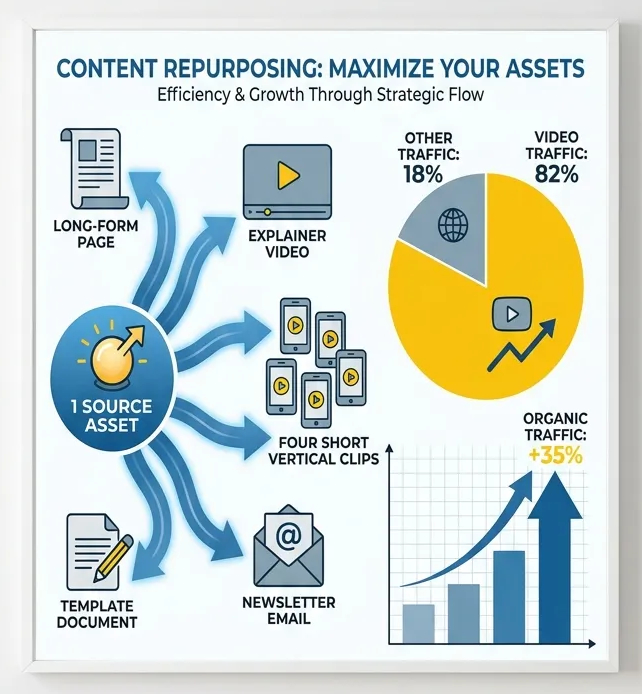
As a solo marketer or founder you need to get more bang for your buck. That’s content repurposing: one strong article becomes a video, short clips, social posts, newsletter sends, ad creative, and link bait. Back in 2022, Cisco pegged video at 82% of internet traffic and it’s only climbed since.
Here’s the full system — six steps to turn one article into a traffic engine.
Step 1: Treat your article as a wellspring for content.
Change how you think about article creation. A good article isn’t the end product, it’s just the beginning.
Before you publish, ask:
- Which parts can become a video?
- Which lines can become short clips?
- What stat, benchmark, or template makes this worth citing?
- What next step ties traffic to revenue?
One article should give you up to 20 different pieces of content.
| Asset from one article | Goal | Best channel |
|---|---|---|
| Long-form article | Search traffic | |
| Explainer video | Reach + engagement | YouTube |
| Short vertical clips | Attention + referral | TikTok, Reels, Shorts, LinkedIn |
| Newsletter version | Owned audience | |
| Free Checklist or Stats | Backlinks | Blogs + newsletters |
Pivot your thinking to “How much more can I get from what I already created?”
Step 2: Turn your article into video in minutes, not days
I know, making a video sounds like a production project. It isn’t anymore. Your article already has the structure a video needs: hook (intro), problem, 3–5 lessons (your H2s), an example, a call to action. That’s your script.
This is exactly how SEOZILLA builds your articles and video. You don’t write a script, hire a presenter, or learn an editor — SEOZILLA takes your finished article and generates a video with an AI presenter, voiceover, and scene clips. The article you already wrote becomes a watchable video on its own, and the same content fuels everything below.
I am sure you have done this yourself before, you see a snippet of a video, click through and then read the article.
Don't do this manually!
Step 3: Hunt down the best bits
The full video is also a source of raw material. Pull out the moments that stand alone:
- A strong opinion
- A surprising stat
- A simple framework
- A common mistake
- A before-and-after
One idea per clip. A single article → one video → 6–12 clips → weeks of posts.
Three rules that make clips work:
- Lead with the payoff. Strongest line first — e.g. “Your blog post should create 10 assets, not just one.”
- Add movement. Captions, cuts, zooms, screenshots, charts, B-roll.
- One job per clip. Teach, challenge, or tease — never all three.
Step 4: Post every clip with a path back to the article
Short videos should guide people back to the article. That’s where search traffic, internal links, product mentions, email signups, and affiliate clicks happen.
Your posting system should include:
- A short caption explaining why the clip matters
- A clear reason to click through
- A platform-correct link
- UTMs for tracking
Be honest about what this does: clips drive referral traffic first, plus indirect SEO value through brand searches and longer dwell time. They’re not a direct ranking factor — the article stays home base, and every clip sends fresh attention back to it.
Step 5: Put budget behind the clips that already work
Organic posting is your test; paid is your amplifier. When a few clips clearly beat the rest, put spend behind those only. Look for:
- Strong watch time
- High saves or shares
- Good click through rates
- Comments that show buyer intent
Even a modest test reveals the hook and audiences that convert, which then shapes your next article and video. This compounds when the article sits close to a conversion (free download, demo, product page): the winning clip doubles as ad creative.
Step 6: Make the article citable so it earns real backlinks
Traffic is good; backlinks make the whole engine stronger. Sites link to assets, not opinions. The best options:
- An original stat from your own data
- A small benchmark report
- A reusable checklist
- A template others can share
- A comparison table.
Video and infographics reportedly earn ~2.5× more backlinks than plain text. After publishing, add one citable object, then pitch it simply:
- Find writers and newsletter editors who cover the topic
- Mention the stat, benchmark, or template
- Explain why their readers would care
- Link to the exact section
Frequently Asked Questions
Taking one piece of content and turning it into other formats. A blog post becomes a video, short clips, email content, social posts, graphics, or a template. The goal is more reach and results from work you already did.
Don’t read the article word for word. Use it as a script outline, then rewrite for dialog. Use shorter lines and stronger transitions. Focus on the main points, not every detail.
Not directly. They mainly drive referral traffic and brand awareness and get more people searching for or sharing your content — signals that support growth even though they aren’t direct ranking factors.
Develop one core asset each week: publish the article, turn it into a video, cut short clips, email your list, and only promote the formats that get traction.
The whole system in one line: write one useful article, turn it into a video, clip the best moments, post them with a path back, fund what works, and make the original strong enough to earn links.
Next time you hit publish, skip “What should I create next?” Ask “How many traffic paths can I build from this one article?”
Your articles can become videos
Every SEOZILLA member now gets our NEW video tool built in. For each article your plan lets you publish every month, you can turn it into a full video. It includes an AI presenter, voiceover, clips and more.